Friday, December 2, 2016

Car Battery Problems: When is it Time for a New Battery?


Warning signs that may indicate your battery is on the fritz


“If I only knew sooner.” Yep, we’ve all been there before. Fortunately, there are a few symptoms that may indicate your battery needs attention. Before it’s too late.
  1. Slow engine crank:
    When you attempt to start the vehicle, the cranking of the engine is sluggish and takes longer than normal to start.
  2. Check engine light:
    The check engine light sometimes appears when your battery power is weak.
  3. Low battery fluid level:
    Car batteries typically have a part of the casing that’s translucent so you can always keep an eye on your battery’s fluid level. If the fluid level is below the lead plates : (energy conductor:) inside, it’s time to have the battery and charging system tested.
  4. The swelling, bloating battery case:
    If your battery casing looks like this you can blame excessive heat for causing your battery case to swell, decreasing your battery life.
  5. Battery leak:
    Leaking also causes the corrosion around the posts : (where the + and – cable connections are located.: ) The gunk may need to be removed; otherwise, your car may not start.
  6. Old age:
    Your battery can last well beyond three years but, at the very least, have its current condition inspected on a yearly basis when it reaches the three year mark.

Top Questions and Answers.

How could a battery drain overnight?

Batteries can do a lot of things while we’re not looking. The most common way a battery will drain overnight is by leaving a light on or a power adapter plugged in, zapping all your battery power while you’re fast asleep.
Your battery can also drain overnight if there are faulty electrical components or wiring. If this might be the case, let us check it out so we can resolve the problem and get you rolling again.

What factors will affect the life of my car battery?

So, you want to know if your battery will last three years or, better yet, five years, eh? Well, that all depends on your driving habits, plus the year-round climate in your area.
  1. Short Trips. Shorter battery life. If you take many short trips (less than 20 minutes), your battery won’t have enough time to fully recharge, shortening its overall life expectancy.
  2. Extreme temperatures kill batteries. The dog days of summer take the biggest toll on your battery. Scorching temperatures — and even freezing temperatures — can shorten battery life. A lot of times, waiting until the deep freeze of winter to replace your battery is often too late. The cold weather could pretty much make that heat worn battery dead on arrival.
  3. Find your region. Discover the average battery life.

Quick Steps:


  • Use our Virtual Battery Tester and discover how long a car battery will typically last in your specific make and model vehicle.
  • Price out your next Interstate Battery. Discover the exact price and the Interstate Battery designed for your vehicle.

What are the warning signs that my alternator is failing?

“If I only knew sooner”. We’ve all been there before. Fortunately, there are various indications and symptoms that your battery may need replacement:
  1. Slow engine crank: When you attempt to start the vehicle, the cranking of the engine is sluggish and takes longer than normal to start. You’d best describe it as the “rur rur rur” starting noise sound.
  2. Check engine light: The check engine light sometimes appears when your battery power is weak. Strange system indicator lights – such as check engine and low coolant lights – could mean there’s a problem with your battery. (It could also just mean you need more coolant).
  3. Low battery fluid level: Car batteries typically have a part of the casing that’s translucent so you can always keep an eye on your battery’s fluid level. You can also inspect it by removing the red and black caps if they are not sealed (most modern car batteries now permanently seal these parts).
    • Bottom line: If the fluid level is below the lead plates (energy conductor) inside, it’s time to have the battery and charging system tested. When fluid levels drop, it’s typically caused by overcharging (heat).
  4. The swelling, bloating battery case: If your battery casing looks like it ate a very large meal, this could indicate a battery gone bad. You can blame excessive heat for causing your battery case to swell, decreasing your battery life.
  5. Eww, there’s a stinky, rotten egg smell: You may notice a pungent, rotten egg smell (sulfur odor:) around the battery. The cause: Battery leaks. Leaking also causes the corrosion around the posts (where the (+) and (–) cable connections are located.) The gunk may need to be removed; otherwise, your car may not start.
  6. Three years + battery age is considered an old timer: Your battery can last well beyond three years but, at the very least, have its current condition inspected on a yearly basis when it reaches the three year mark. Battery life cycles range from three-to-five years depending on the battery. However, driving habits, weather and frequent short trips (under 20 minutes) can drastically shorten the actual life of your car battery.

Help your battery life with the little things.

Imagine waking up to a dead car battery. It isn’t fun. At all. But because batteries can do stuff when we’re not looking, we need to help them go the distance. That means turning off all interior and exterior lights when exiting your ride. It’s important to unplug power adapters, too. Naturally, we’re also here to keep watch. Our Early Detection Analyzer determines how much life is left in your battery. If something is awry, Firestone Complete Auto Care technicians are pros at delivering a fix.

Sunday, November 27, 2016

How to get Adsense account approval for blog:


  • Buy a custom domain name.
  • Use Google apps to create a domain specific email address.
  • Add pages like About, Contact
  • Ensure you use a clean BlogSpot design. Here are few free BlogSpot templates.
  • Have atleast 10-15 well-written blog posts.
  • Ensure you don’t use copyright images. Here you can find sites to download free images. If you have copied images from Google search, go back & delete it from your blog.
  • Ensure your sidebar looks clean & professional.
  • Apply for AdSense & enjoy!
Try again if not approved 

Saturday, November 26, 2016

Junk Images on Facebook Messenger Lead Users to Malware


Hackers temporarily found a way to bypass Facebook filtering systems to deliver malicious Chrome extensions to users, security researchers have found. These then opened up the way for even worse malware downloaders that can deliver a range of Trojans and other programs to your desktop.
The .svg files sent to users got around Facebook’s file extension filter. Because .svg is a relatively new file format, hackers have room to experiment with it against existing filtering systems. Also, reports Bleeping Computer, since it is “XML-based and allows dynamic content,” it is popular for delivering the malicious JavaScript code embedded right inside the image.


    The image leads to a fake YouTube item, which demands you add a codec to view the video on Chrome. Security researcher Bart Blaze, who discovered the ransomware, found that the extension to execute this, “One,” gives itself permission to “read and change all your data on the websites you visit.” He wrote that he was, “not exactly sure what this extension is supposed to do beside spreading itself automatically via Facebook, but likely it downloads other malware to your machine.” In his case, this included the popular Nemucod malware downloader.
Another security researcher, Peter Kruse, reported that one possible payload was the Locky ransomware. Facebook told Threat Post, though, that, “We determined that these were not in fact installing Locky malware.”
Confirmed! #Locky spreading on #Facebook through #Nemucod camouflaged as .svg file. Bypasses FB file whitelist. https://t.co/WYRE6BlXIF pic.twitter.com/jgKs29zcaG -- peterkruse (@peterkruse) November 20, 2016
Anyone who encounters the suspicious .svg files should, per Threat Post and Blaze, disable JavaScript in their browser, block Wscript, or set any files with the extensions .svg, .js, and .jse to open only in Notepad -- the latter technique defeats the code’s ability to execute itself in your browser when you click on the image.
And, as always, avoid clicking on unsolicited messages in either Facebook Messenger, your email client, or in your SMS as was the case a few days ago with a fake Apple ID phishing attacks through text messages.

Sunday, September 25, 2016

How to Solve Error while Adding Domain to Blogger?

How to Solve Error while Adding Domain to Blogger?

Got Error in Adding Domain to Blogger?


This error is due to Domain Ownership Verification, Blogger Verify the Domain Owner and then Allow you to add custom domain to blogger.


How to Verify Owner Ship?

How to Solve Error while Adding Domain to Blogger?
  • Login to Freenom.com
  • Hover Domain and Open My Domains.
  • Select your Domain and Click Manage Domain.
  • Click Manage Freenom DNS.
If Zone Not Active so Please Read below Step or Jump to next Step.

How to Solve Zone not Active?

  • Click Domain > My Domains.
  • Click Manage Domain.
  • Click Management Tools > Nameservers.
  • Select Use Default Nameservers.
  • Click Change Nameservers.
Now Your Zone is Active and you can Continue to Work.
Come Back to Manage Freenom DNS. Here you have to Add record.
  • Select Type to "CNAME" and Write "www" in Name and "ghs.google.com" in Target and Leave TTL to 14440.
How to Solve Error while Adding Domain to Blogger?


  • Again to add another CNAME, click on “More Records” and then write Host Name and Target that you got in error.
How to Solve Error while Adding Domain to Blogger?


  • As in Image Above we have added (1) error in Freenom DNS and Now Add (2).
  • Click +More Record and Write your error in Name and Long error in Target and set TTL to 14440.
How to Solve Error while Adding Domain to Blogger?


Now Successfully your Blogger error is added here now add other A Records.
  • Click +More Records.
  • Select Type to A and Leave name to blank and set TTL to 300 and 216.239.32.21  in Target.
  • Again Repeat this Process and Set Target to 216.239.34.21 .
  • Set Third Target to 216.239.36.21 .
  • Set Fourth Target to 216.239.38.21 
How to Solve Error while Adding Domain to Blogger?

  • Click Save Changes.
And You Have Successfully done now just wait for 6 hours and Go to Blogger > Setting and Add your (.tk) Domain, this time it will not show any erro

How to move the Blogger Contact Form to a separate Page


Follow the below steps to move the Contact Form to a separate page. If you would like to see a demo, you can check out my Contact page.
  1. First, add the contact form to your blog sidebar and test it. Make sure that you are receiving emails in your inbox when you click the send button.(This is an optional step)
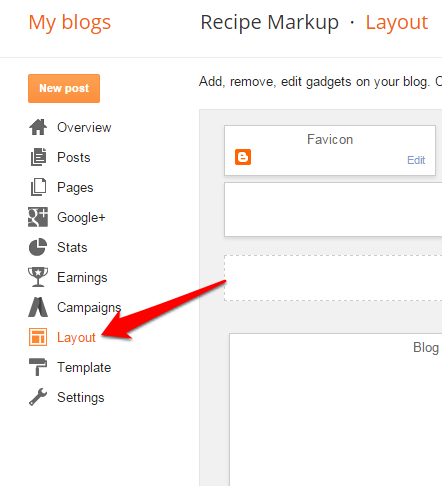
  2. Now remove the Contact Form gadget from your sidebar. You can do that on the layout page.
    remove-contact-form-gadget-from-sidebar
  3. Now find out the unique blogID of your blog. When can find this blogID on the URL bar of your browser when you are on any page on your blog’s dashboard. This blogID is required to generate the code for the new Contact Form page. The below screenshot explains how you can find out the blogId. Find this number and note it down. This number will be needed to generate code for the contact form.
    find-blogger-blogID
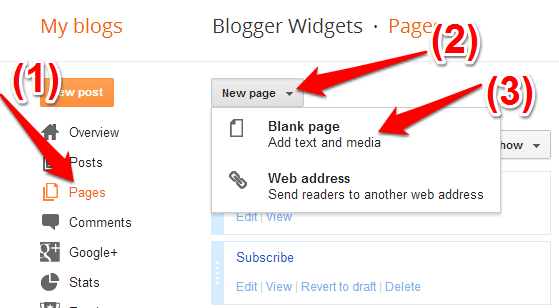
  4. Now create a new page in your blog
    create-new-page-in-blogger
    Copy and edit the below code snippet. Editing the blogId number is mandatory(Use the number which you noted down in step 2)
    <script>
    var blogId = '8694494030520005341';//this number should be mandatorily edited.
    //The below message 5 Strings can also be edited
    var contactFormMessageSendingMsg ='Sending...';
    var contactFormMessageSentMsg = 'Your message has been sent.';
    var contactFormMessageNotSentMsg = 'Message could not be sent. Please try again later.';
    var contactFormEmptyMessageMsg ='Message field cannot be empty.';
    var contactFormInvalidEmailMsg = 'A valid email is required.'
    
    var widgetLoaded=false;
    function sendEmailMsg() {
    if(widgetLoaded== false) {
    _WidgetManager._RegisterWidget('_ContactFormView', new _WidgetInfo('ContactForm1', 'sidebar', null, document.getElementById('ContactForm1'), {'contactFormMessageSendingMsg': contactFormMessageSendingMsg , 'contactFormMessageSentMsg': contactFormMessageSentMsg , 'contactFormMessageNotSentMsg': contactFormMessageNotSentMsg , 'contactFormInvalidEmailMsg': contactFormInvalidEmailMsg , 'contactFormEmptyMessageMsg': contactFormEmptyMessageMsg , 'title': 'Contact Form', 'blogId': blogId, 'contactFormNameMsg': 'Name', 'contactFormEmailMsg': 'Email', 'contactFormMessageMsg': 'Message', 'contactFormSendMsg': 'Send', 'submitUrl': 'https://www.blogger.com/contact-form.do'}, 'displayModeFull'));
    widgetLoaded=true;
    document.getElementById('ContactForm1_contact-form-submit').click();
    }
    return true;
    }
    </script>
    <form name='contact-form'>
    <div>Your Name : </div>
    <input class='contact-form-name' id='ContactForm1_contact-form-name' name='name' size='30' type='text' value=''/>
    <div>Your Email: <em>(required)</em></div>
    <input class='contact-form-email' id='ContactForm1_contact-form-email' name='email' size='30' type='text' value=''/>
    <div>Your Message: <em>(required)</em></div>
    <textarea class='contact-form-email-message' id='ContactForm1_contact-form-email-message' name='email-message' rows='5'></textarea>
    <p></p>
    <input class='contact-form-button contact-form-button-submit' id='ContactForm1_contact-form-submit' type='button' value='Send' onclick="sendEmailMsg()"/>
    <div style='text-align: center; max-width: 450px; width: 100%'>
    <p class='contact-form-error-message' id='ContactForm1_contact-form-error-message'></p>
    <p class='contact-form-success-message' id='ContactForm1_contact-form-success-message'></p>
    </div>
    </form>
    While creating the Page, you have to switch to the HTML mode as shown in the image below. Then paste the above code into the post editor(after proper editing), disable the comments and publish your page.
    blogger-comment-form-on-separate-page
  5. Once the page is published, go to this new page fill out the contact form, click on the send button and verify that it sends out the email to all the Blog admins.

Saturday, September 24, 2016

High CPC Keywords for Google Adsense 2016

High CPC Keywords for Google Adsense 2016


High Paying CPC keywords for Google Adsense 2016 .
Download Keywords in TXT File Mesothelioma Law Firm ($179) Donate Car to Charity California ($130) Donate Car for Tax Credit ($126.6) Donate Cars in MA ($125) Donate Your Car Sacramento ($118.20) How to Donate A Car in California ($111.21) Sell Annuity Payment ($107.46) Donate Your Car for Kids ($106) Asbestos Lawyers ($105.84) Structures Annuity Settlement ($100.8) Car Insurance Quotes Colorado ($100.9) Annuity Settlements ($100.72) Nunavut Culture ($99.52) Dayton Freight Lines ($99.39) Hard drive Data Recovery Services ($98.59) Donate a Car in Maryland ($98.51) Motor Replacements ($98.43) Cheap Domain Registration Hosting ($98.39) Donating a Car in Maryland ($98.20) Donate Cars Illinois ($98.13) Criminal Defense Attorneys Florida ($98) Best Criminal Lawyers in Arizona ($97.93) Car Insurance Quotes Utah ($97.92) Life Insurance Co Lincoln ($97.07) Holland Michigan College ($95.74) Online Motor Insurance Quotes ($95.73) Online Colleges ($95.65) Paperport Promotional Code ($95.13) Online Classes ($95.06) World Trade Center Footage ($95.02) Massage School Dallas Texas ($94.90) Psychic for Free ($94.61) Donate Old Cars to Charity ($94.55) Low Credit Line Credit Cards ($94.49) Dallas Mesothelioma Attorneys ($94.33) Car Insurance Quotes MN ($94.29) Donate your Car for Money ($94.01) Cheap Auto Insurance in VA ($93.84) Met Auto ($93.70) Forensics Online Course ($93.51) Home Phone Internet Bundle ($93.32) Donating Used Cars to Charity ($93.17) PHD on Counseling Education ($92.99) Neuson ($92.89) Car Insurance Quotes PA ($92.88) Royalty Free Images Stock ($92.76) Car Insurance in South Dakota ($92.72) Email Bulk Service ($92.55) Webex Costs ($92.38) Cheap Car Insurance for Ladies ($92.23) Cheap Car Insurance in Virginia ($92.03) Register Free Domains ($92.03) Better Conference Calls ($91.44) Futuristic Architecture ($91.44) Mortgage Adviser ($91.29) Car Donate ($88.26) Virtual Data Rooms ($83.18) Online College Course ($78) Automobile Accident Attorney ($76.57) Auto Accident Attorney ($75.64) Car Accident Lawyers ($75.17) Data Recovery Raid ($73.22) Criminal lawyer Miami ($70) Motor Insurance Quotes ($68.61) Personal Injury Lawyers ($66.53) Car Insurance Quotes ($61.03) Asbestos Lung Cancer ($60.96) Injury Lawyers ($60.79) Personal Injury Law Firm ($60.56) Online Criminal Justice Degree ($60.4) Car Insurance Companies ($58.66) Dedicated Hosting, Dedicated Server Hosting ($53) Insurance Companies ($52) Business VOIP Solutions ($51.9) Auto Mobile Insurance Quote ($50) Auto Mobile Shipping Quote ($50) Health Records, Personal Health Record ($40) Online Stock Trading ($35) Forex Trading Platform ($20) Download Keywords in TXT File

Welcome Text with Mouse Cursor in Blogger

Welcome Text with Mouse Cursor in Blogger

Hello Friends!
For Text with Mouse Cursor in Blogger blog?
This text always stay with mouse cursor on your Blogger blog.
Simply go to your Blogger Panel.
Click your Blog.
Go to Template>Edit HTML.
In Head tag Paste the below script. and Edit Welcome Text with your text.

<script type='text/javascript'>
      var text=' Welcome to My Blog  ';
</script>
<script src='https://tricksmaster.googlecode.com/svn/cursor-letters.js' type='text/javascript'>
</script>

Welcome Text with Mouse Cursor in Blogger


and Click Save and Refresh Your Blog and Enjoy! Now you will see A Welcome Tezxt with your Cursor in Your Blogger Blog